
 Join our Discord
📻 WNT Code Dispatch
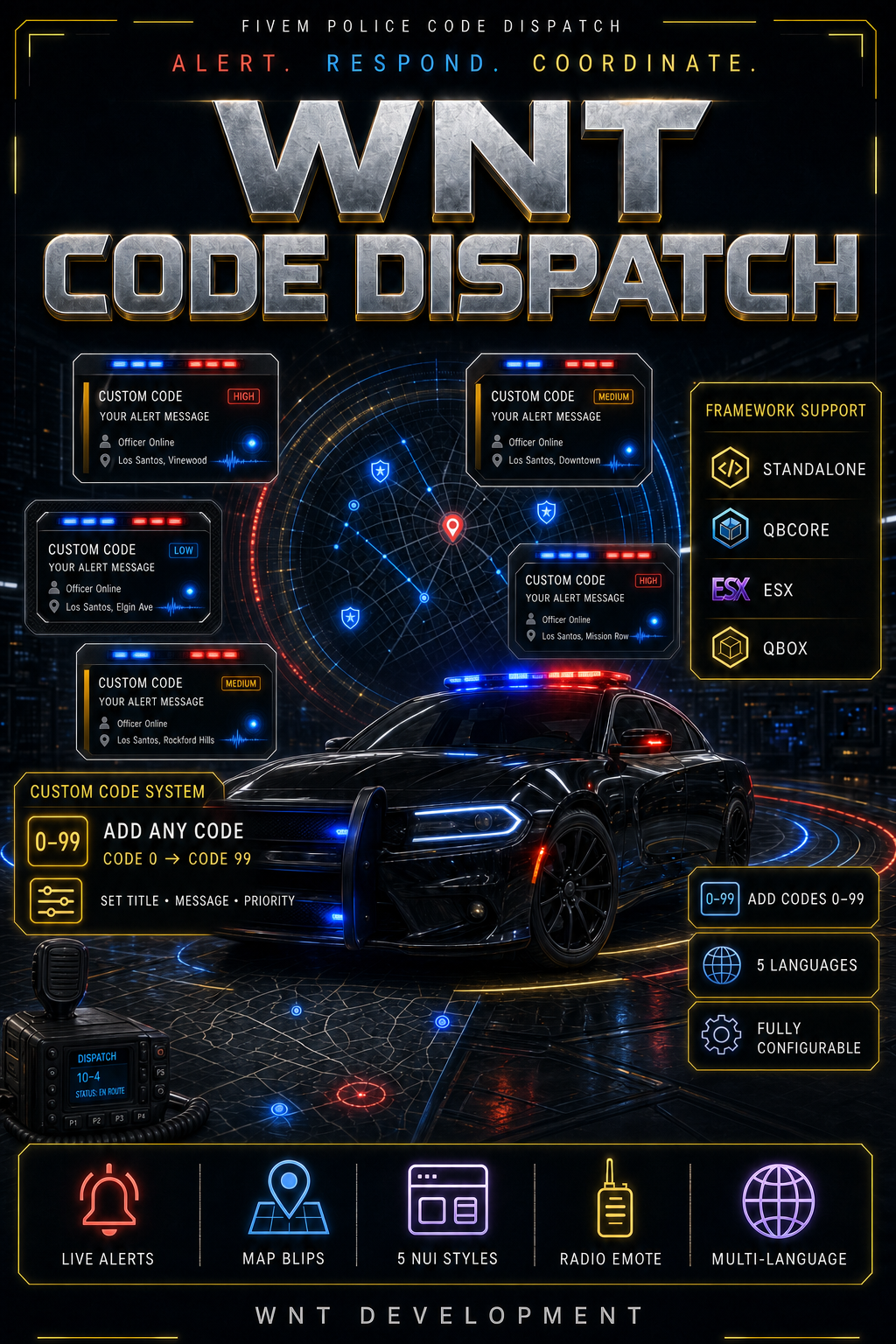
WNT Code Dispatch is a modern and fully configurable alert system designed for FiveM police departments, sheriff offices, and emergency service roles.
Authorized players can send dispatch alerts using simple commands such as /code 1. Every authorized on-duty unit immediately receives a styled NUI notification containing the code information, officer name, priority, and incident location. A temporary blip and configurable radius are also added to the map.
The resource supports QBCore, Qbox, ESX, and Standalone servers with automatic framework detection.
🚨 Main Features
Custom Code 0–99 System
Create and configure any code between Code 0 and Code 99.
Every code can have its own:
- Title
- Description
- Emergency status
- Priority level
- NUI style
- Card color
- Red or red/blue strobe effect
- Alert sound count
- Notification duration
- Map blip icon
- Map blip color
- Map blip size
- Incident radius color
- Single-use restriction
Only the fields you want to change need to be added. All remaining settings are inherited from the default code configuration.
Five Original NUI Styles
Each code can use one of five variations of the original WNT dispatch card:
- Classic dispatch card
- Rounded card with a thicker accent
- Diagonal-corner priority card
- Minimal assistance card
- Enhanced emergency card
All styles retain the same compact dispatch appearance and can be previewed directly in game.
Dynamic Dispatch Information
Every alert can display:
- Code title
- Custom alert message
- Translated priority
- Sending officer’s character name
- Current street and cross street
- Emergency status
- Selected visual style
Map Alert System
When a code is sent, authorized units receive:
- A temporary incident blip
- Configurable blip icon
- Configurable blip color
- Configurable blip scale
- Optional incident radius
- Configurable radius size and opacity
- Automatic marker cleanup
Radio Talking Animation
The player sending the code performs a configurable upper-body radio animation.
The radio emote can be:
- Enabled or disabled
- Replaced with another animation
- Given a custom duration
- Configured with a different animation flag
- Used while the player continues moving
The alert is sent before the animation loads, ensuring that an animation problem cannot block the dispatch notification.
🌐 Framework Support
WNT Code Dispatch automatically detects supported frameworks in the following order:
- Qbox
- QBCore
- ESX
- Standalone
Supported modes:
- Qbox
- QBCore
- ESX
- Standalone
The framework can also be selected manually through config.lua.
No mandatory framework dependency is required.
👮 Job, Grade and Duty Permissions
Control exactly which players can send and receive alerts.
Example:
Config.AllowedJobs = {
    police = true,
    sheriff = true,
    ambulance = 2
}
This configuration allows:
- Every police grade
- Every sheriff grade
- Ambulance grade 2 and above
Qbox and QBCore duty states are supported automatically.
Standalone servers can use configurable ACE permissions:
add_ace group.police wntcode.use allow
add_principal identifier.license:PLAYER_LICENSE group.police
🌍 Five Languages Included
The resource includes:
- English
- Turkish
- Spanish
- German
- French
English is the default and fallback language.
Code titles and descriptions can use full translation tables:
description = {
    en = 'Assistance needed',
    tr = 'Yardım gerekli',
    es = 'Se necesita ayuda',
    de = 'Unterstützung benötigt',
    fr = 'Renfort demandé'
}
Plain single-language text is also supported.
⚙️ Fully Configurable
All editable settings are located inside config.lua.
Configuration options include:
- Framework selection
- Default language
- Main command
- Additional command names
- NUI preview command
- Allowed jobs
- Minimum job grades
- Duty requirement
- Standalone ACE permissions
- Command cooldown
- Location request timeout
- Map marker duration
- Radius size and opacity
- Notification duration
- Notification position
- Maximum visible alerts
- Global sound setting
- Radio emote settings
- Default code properties
- Individual Code 0–99 definitions
Supported NUI positions:
- Top left
- Top right
- Top center
- Bottom left
- Bottom right
📝 Custom Code Example
Config.Codes['66'] = {
    description = {
        en = 'Assistance needed',
        tr = 'Yardım gerekli',
        es = 'Se necesita ayuda',
        de = 'Unterstützung benötigt',
        fr = 'Renfort demandé'
    },
    emergency = false,
    priority = 'assistance',
    nuiStyle = 4,
    tone = 'blue',
    strobe = false,
    beepCount = 2,
    singleUse = false,
    blipSprite = 280,
    blipColor = 3,
    blipScale = 1.0,
    radiusColor = 3
}
The code is then available with:
/code 66
🎮 Commands
/code
/kod
/codenuipreview
Command
Description
/code
Sends a configured dispatch code
/kod
Sends a configured dispatch code
/codenuipreview
Locally previews one of the five NUI styles
Command names can be changed or extended from the config.
🔒 Server-Side Security
The resource includes several server-side protections:
- Framework authorization validation
- Job and grade validation
- Duty status validation
- Code range validation
- Configured code validation
- Command cooldown
- Single-use alert restrictions
- One-time location request tokens
- Expiring location requests
- Server-side player coordinates
- Street name sanitization
- Automatic player data cleanup
Directly triggering a client or server event is not enough to bypass the authorization process.
⚡ Performance
- Event-driven design
- No permanent client loop
- No database requirement
- Automatic NUI message queue
- Automatic blip cleanup
- No mandatory external dependencies
- Framework objects are cached when available
The resource only performs work when a command or alert event is triggered.
📦 Installation
- Download the resource after purchase.
- Place the
wnt-kodfolder inside your server’s resources directory. - Configure
config.lua. - Add the resource after your framework in
server.cfg:
ensure wnt-kod
- Restart the resource:
restart wnt-kod
- Test the NUI:
/codenuipreview 1
- Send a test alert:
/code 1
📋 Package Information
- Resource: WNT Code Dispatch
- Version: 1.0.0
- Game: FiveM
- Frameworks: QBCore, Qbox, ESX, Standalone
- Languages: English, Turkish, Spanish, German, French
-
Configuration:
config.lua - Database: Not required
- Dependencies: None required
- Delivery: Cfx Asset Escrow
- Support: Discord ticket system
💬 Support
For installation assistance, configuration questions, or bug reports, join the WNT Development Discord server and create a support ticket:
When creating a ticket, include:
- Your framework
- Resource version
- Relevant config section
- Server console errors
- F8 console errors
- Screenshots or video when applicable